# Image Optimization Analytics

The **Analytics** dashboard provides visibility into how Medianovaâ€™s image optimization engine performs across your CDN resources.\
It highlights key performance metricsâ€”such as **GPU utilization**, **processing throughput**, and **optimization efficiency**â€”to help you ensure consistent, fast, and cost-effective image delivery.

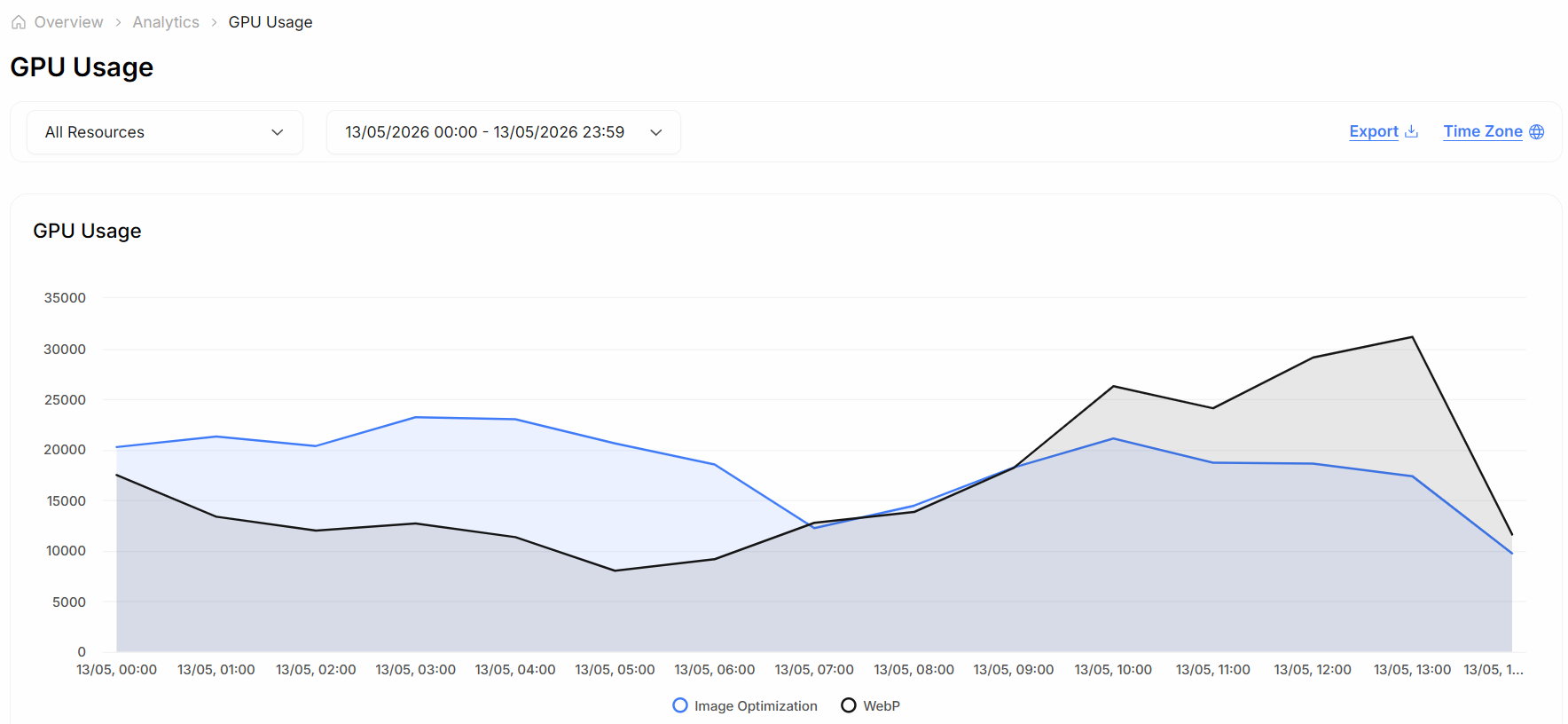
<figure><img src="https://542970813-files.gitbook.io/~/files/v0/b/gitbook-x-prod.appspot.com/o/spaces%2FtK7oIwmhUHdEJcaH4Hx8%2Fuploads%2Feen9KYt09tvWMdfoSVSW%2Fimage.png?alt=media&#x26;token=90321559-4213-4281-a1e0-a14e3bf1d8fc" alt="" width="563"><figcaption><p>Medianova Image Optimization Analytics</p></figcaption></figure>

#### Available Metrics

The **GPU Usage** chart visualizes how system resources are utilized during image processing and WebP conversion.

<table><thead><tr><th width="191">Metric</th><th>Description</th></tr></thead><tbody><tr><td><strong>Peak Usage</strong></td><td>The highest GPU utilization percentage observed during the selected time period.</td></tr><tr><td><strong>Average Usage</strong></td><td>The mean GPU workload over the reporting window.</td></tr><tr><td><strong>Time-Based Trends</strong></td><td>Shows fluctuations in GPU activity correlated with request load or time of day.</td></tr></tbody></table>

{% hint style="info" %}
Use shorter time ranges (e.g., last 1 hour) to analyze real-time optimization performance, or longer ranges (e.g., 24h/7d) for trend analysis.
{% endhint %}

#### How to Interpret Data

**1. High GPU Usage**

* Indicates heavy image transformation or large-scale WebP conversion.
* Expected during peak traffic or mass optimization operations.
* Sustained high usage may suggest scaling additional GPU resources.

**2. Low GPU Usage**

* Suggests reduced processing demand or effective caching.
* Typically means the system is efficiently serving pre-optimized images.
* If traffic is high but GPU usage remains low, caching and delivery optimizations are working as intended.

**3. Sudden Spikes**

* Can occur due to unoptimized workflows or irregular API request patterns.
* Investigate spikes to ensure consistent response times and workload distribution.

#### Optimization Opportunities

Regular monitoring of **GPU Analytics** helps identify areas where optimization can further improve performance:

* **Balance Workloads** â€“ Distribute image processing evenly across nodes to prevent bottlenecks.
* **Improve Caching Efficiency** â€“ Minimize repetitive optimization tasks for identical images.
* **Scale Resources** â€“ Allocate or deallocate GPU nodes dynamically based on load.
* **Refine Parameters** â€“ Adjust image resizing, compression, or WebP settings for cost-performance balance.

{% hint style="info" %}
Performance data can also inform future infrastructure planning, ensuring you scale only when necessary.
{% endhint %}

#### Why Analytics Matters

Monitoring **GPU Usage** ensures that Medianovaâ€™s Image Optimization system operates at peak performance, delivering measurable business benefits:

* **Faster Image Delivery** â€“ Reduce latency through balanced edge processing.
* **Cost Efficiency** â€“ Avoid over-provisioning GPU resources.
* **Reliability and Stability** â€“ Prevent system slowdowns during peak image workloads.
* **Data-Driven Decisions** â€“ Optimize configuration based on real metrics, not assumptions.

Efficient resource utilization directly contributes to smoother operations, improved user experience, and lower operational costs.
