> For the complete documentation index, see [llms.txt](https://clients.medianova.com/llms.txt). Markdown versions of documentation pages are available by appending `.md` to page URLs; this page is available as [Markdown](https://clients.medianova.com/account-management/editor/access-controls-and-authentication.md).
# Configure access controls and authentication
Learn how to manage authentication, API credentials, and user roles in the Medianova Control Panel.
Access controls and authentication define how users and systems securely interact with Medianova services.\
This page explains how to:
* Secure your account with two-factor authentication (2FA)
* Generate and manage API credentials
* Control user access through role-based permissions
These mechanisms help protect your account, APIs, and CDN resources from unauthorized access while ensuring operational control across your organization.
From the [**Medianova Control Panel**](https://cloud.medianova.com), you can secure your account with two-factor authentication (2FA), generate API credentials, and manage user access through predefined roles.
## Configure authentication and access settings
{% stepper %}
{% step %}
**Enable two-factor authentication (2FA)**
Open **My Profile → My Account**.
Select the **Account Security** tab.
Enable **Two-Factor Authentication (2FA)**.
2FA adds an additional verification step during login.
{% endstep %}
{% step %}
**Generate API credentials**
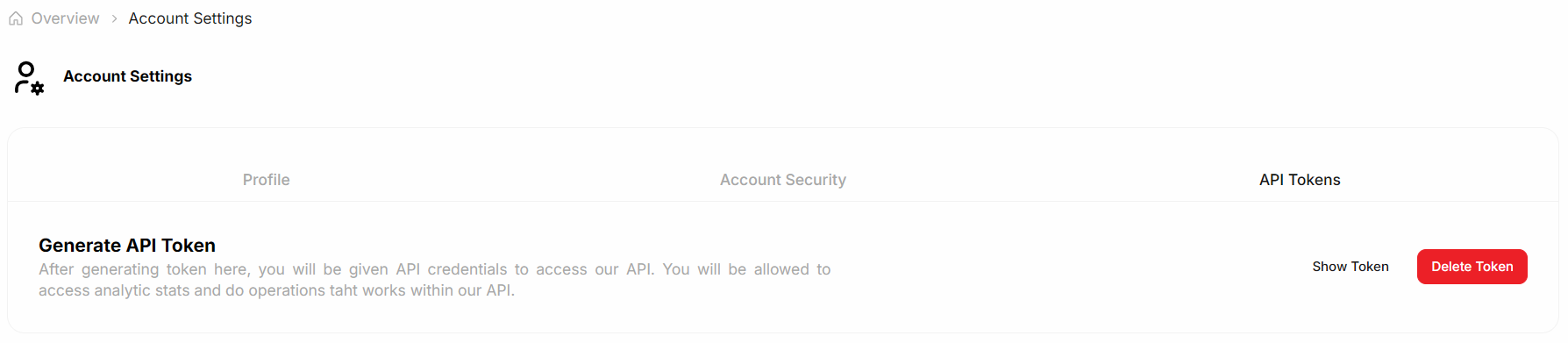
From **My Account**, open the **API Tokens** tab.
Click **Generate Token**.
The system generates an **API Key** and **API Secret**.
* Access token validity: **4 hours**
* API key and refresh token validity: **30 days**
{% endstep %}
{% step %}
**Manage user roles and permissions**
Open **Profile → Organization Management**.
Select your organization.
Assign roles to users based on required access levels.
{% hint style="info" %}
Role-based access control ensures users can access only the resources they need.
{% endhint %}
{% endstep %}
{% endstepper %}
### Available roles
**Super Admin**\
Full administrative access, including user management, CDN Resources, security settings, and billing.
**Operator**\
Technical access to manage CDN Resources and perform operational actions such as purge.
**Billing**\
Access limited to subscription and billing management.
**Viewer**\
Read-only access to CDN Resources and organization information.
### Secured content access
Requests to secured CDN content require a valid, non-expired authentication hash.\
Once the hash expires, the content becomes inaccessible until a new one is generated.
### Summary
Use the Medianova Control Panel to:
* Protect accounts with two-factor authentication
* Generate time-limited API credentials
* Control user access with role-based permissions
These controls are essential for secure and reliable operation of Medianova services.
---
# Agent Instructions
This documentation is published with GitBook. GitBook is the documentation platform designed so that both humans and AI agents can read, navigate, and reason over technical content effectively. Learn more at gitbook.com.
## Querying This Documentation
If you need additional information that is not directly available in this page, you can query the documentation dynamically by asking a question.
Perform an HTTP GET request on the current page URL with the `ask` query parameter, and the optional `goal` query parameter:
```
GET https://clients.medianova.com/account-management/editor/access-controls-and-authentication.md?ask=&goal=
```
`ask` is the immediate question: it should be specific, self-contained, and written in natural language.
`goal` is optional and describes the broader end goal you are ultimately trying to accomplish on behalf of the user. GitBook uses it to tailor the answer towards what is most useful for that goal.
The response will contain a direct answer to the question and relevant excerpts and sources from the documentation.
Use this mechanism when the answer is not explicitly present in the current page, you need clarification or additional context, or you want to retrieve related documentation sections.